
Understanding Tickets
Tickets help you track work across your AI sessions. They're the bridge between "I asked an agent to do something" and "Here's the complete history of what happened."
What is a Ticket?
A ticket represents a unit of work:
- A bug to fix
- A feature to build
- A research question to answer
- A document to write
Each ticket tracks its status, priority, related sessions, and history.
The Kanban Board
Tickets live on a Kanban board with columns representing status:
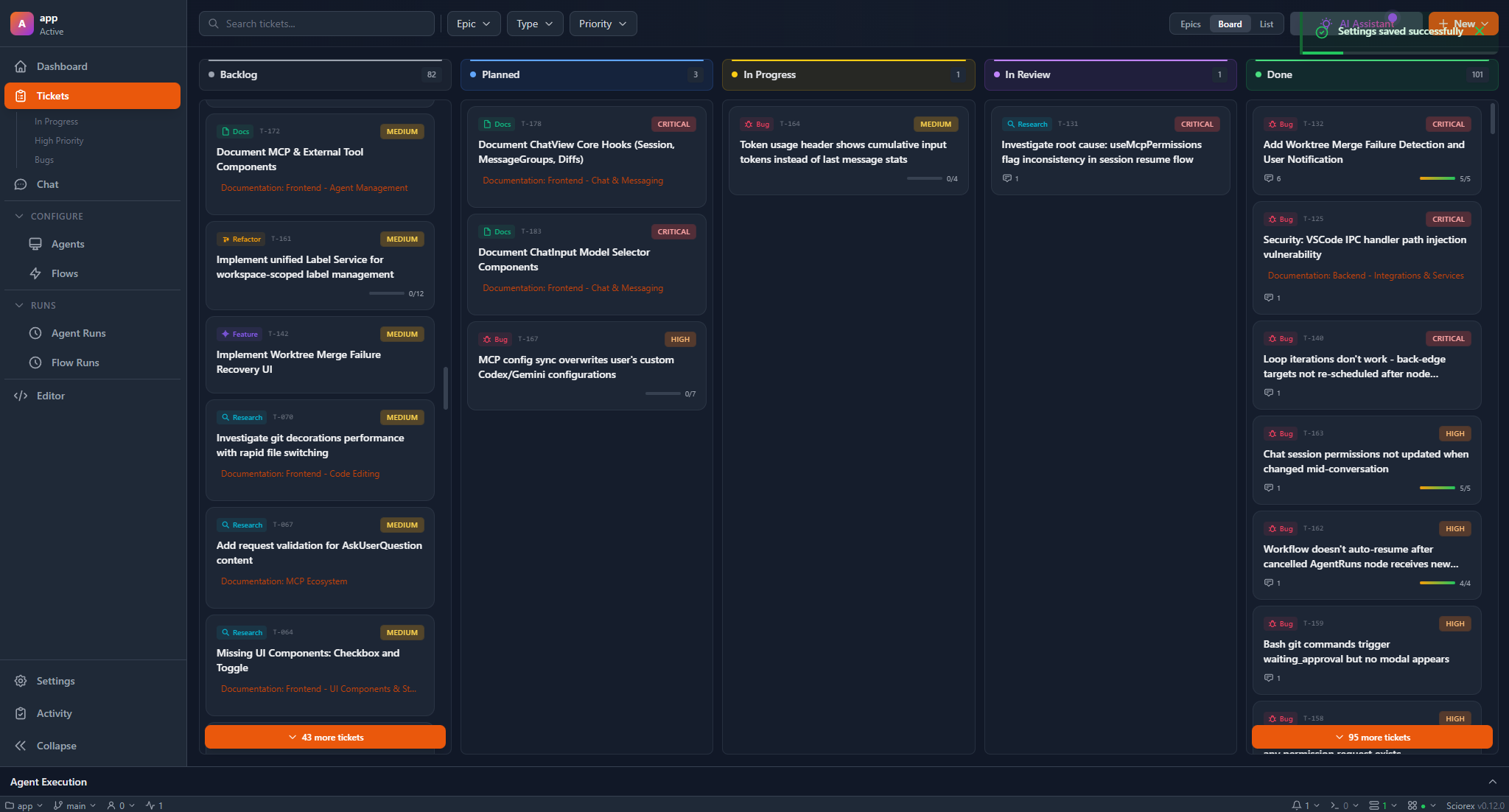
Drag tickets between columns to change their status.
Ticket Properties
| Property | Description |
|---|---|
| Title | Short description of the work |
| Type | Feature, Bug, Task, Research, Documentation, or Refactor |
| Priority | Critical, High, Medium, or Low |
| Status | Where it is in the workflow |
| Epic | Parent grouping for related tickets |
| Subtasks | Smaller steps within the ticket |
Linking Sessions to Tickets
The real power of tickets is linking them to AI sessions. When you work with an agent on a ticket:
- The session is recorded in the ticket's history
- You can see all conversations related to that work
- Other team members can review what the AI did
To link a session:
- Archive a chat and select a ticket
- Or set the ticket context before starting a chat
Epics
Epics group related tickets together. Use them for:
- Large features with multiple parts
- Projects spanning several tasks
- Themes like "Performance Improvements" or "Security Audit"
Each epic shows progress based on how many of its tickets are done.
Subtasks
Break tickets into smaller steps with subtasks:
T-001: Implement user authentication
  ☑ Design API endpoints
  ☑ Create database schema
  ☐ Build login form
  ☐ Add session management
  ☐ Write tests
Subtasks give you granular progress tracking and help agents understand what's left to do.
Relationships
Tickets can relate to each other:
| Relationship | Meaning |
|---|---|
| Blocked by | This ticket cannot proceed until another is done |
| Related to | These tickets are connected but independent |
Blocked tickets show a warning indicator on the board.
Status Transitions
Not all status changes are allowed. Here's what's valid:
| From | Can move to |
|---|---|
| Backlog | Planned, Cancelled |
| Planned | Backlog, In Progress, Cancelled |
| In Progress | Planned, In Review, Done, Cancelled |
| In Review | In Progress, Done, Cancelled |
| Done | In Progress |
| Cancelled | Backlog |
Data Storage
Tickets are stored as YAML files in .tickets/. This means:
- They're version controlled with your project
- You can edit them in any text editor
- They sync through Git like any other file
Best Practices
Keep tickets focused. One ticket = one deliverable unit of work.
Write clear titles. Future you (and your agents) will thank you.
Link sessions early. Don't wait until the work is done to connect the dots.
Use epics for scope. If a ticket keeps growing, break it into an epic with multiple tickets.